



Use Wozber and land your dream job
Create Resume
No registration required
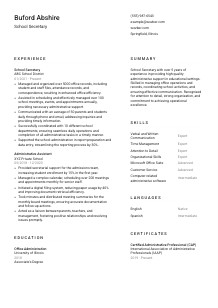
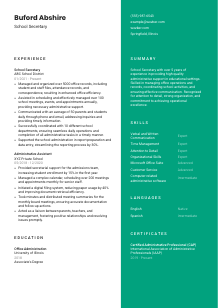
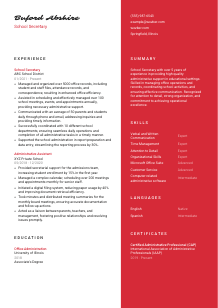
Organizing the school, but your resume looks like a chaotic classroom? Check out this School Secretary resume example, created with Wozber free resume builder. Learn how to present your administrative strengths to match job demands, creating a career path as well-run as a perfectly scheduled school day!
A school secretary keeps the front office running when the day gets busy. Calls come in, attendance questions need answers, student records must stay accurate, meetings have to be scheduled, and parents, staff, and students all expect clear information quickly. Your resume should show that you can handle that daily administrative load with accuracy, discretion, and steady communication.
When your resume is tailored to the posting, school administrators can quickly connect your background to the work on their desk, from records management to front-office communication. Wozber's free resume builder helps you align your wording with the job description in an ATS-friendly resume format, so experience with tasks like attendance tracking, scheduling, and report preparation is easier to recognize early.
For a school secretary, the header should do one thing well: make you easy to identify and easy to contact. Keep it clean, professional, and aligned with any practical requirement the school has listed.
Use your full name in a slightly larger font than the rest of the header so it is easy to scan at the top of the page. In administrative roles, presentation matters because your work often involves organized communication, document handling, and first-contact professionalism. Your header should reflect that same orderliness.
Place "School Secretary" directly under your name if that is the role you are applying for. This immediately connects your resume to the vacancy and helps both the reader and the ATS place you in the right candidate group. If your current title is different, such as Administrative Assistant, you can still use the target title when your experience clearly supports school office work.
Include a reliable phone number and a professional email address, ideally in a simple format such as firstname.lastname@email.com. Since school secretaries are often the first point of contact for parents and staff, small details like a clean email address and accurate phone number reinforce professionalism. Double-check everything before sending.
If the job asks for someone based in Springfield, Illinois, or open to relocating there, include your city and state so that point is handled immediately. That matters more in school hiring than candidates sometimes realize, especially when the office needs dependable on-site support for daily operations, student files, and in-person communication.
A LinkedIn profile or professional website is worth adding if it is current and supports your administrative background. Keep it consistent with your resume, especially around titles, dates, and school-office experience. If the profile is sparse or outdated, leave it off rather than send mixed signals.
Your personal details should remove friction, not add it. When the top of the resume is clear, accurate, and aligned with the posting, the hiring team can move straight to your office support experience and school-facing communication skills.




This section usually carries the most weight for a school secretary. Hiring teams want to see how you have handled records, scheduling, communication, data entry, and day-to-day office support in environments where accuracy and responsiveness matter.
Before writing bullets, mark the duties and requirements that appear most central to the job. Here, that includes organizing student and staff files, managing attendance-related records, scheduling meetings and events, communicating with parents and staff, and supporting reporting and data entry. Those are the experiences your bullets should emphasize first.
Start with your most recent position and work backward. For each role, include your job title, employer name, and employment dates. That structure is standard, easy to scan, and especially useful when a hiring team wants to quickly confirm you meet a requirement such as 2+ years of administrative or secretarial experience.
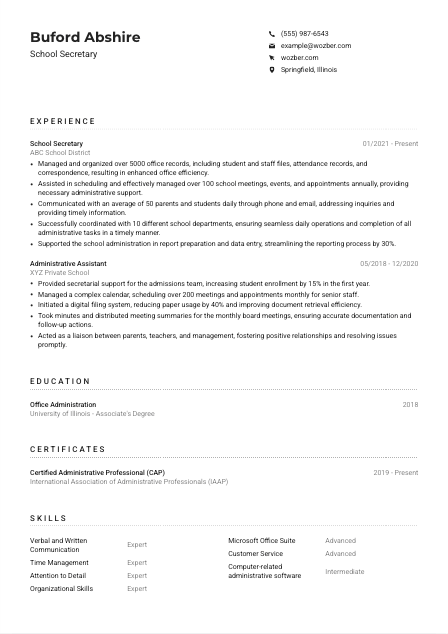
Each bullet should show what you handled and how well you handled it. Use action verbs, then name the task, volume, or outcome. In the example resume, bullets such as managing more than 5000 office records or coordinating over 100 meetings a year work well because they mirror the actual workload of a school office rather than staying vague.
Quantifying your work gives useful scale. For this profession, strong metrics include number of records maintained, calls or inquiries handled per day, meetings scheduled, departments supported, reporting turnaround time, or process improvements. The sample's "communicated with an average of 50 parents and students daily" is effective because it shows front-office volume and service expectations in one line.
Keep the section focused on administrative work that translates to a school setting. Filing systems, calendars, report preparation, parent communication, database updates, meeting support, and cross-department coordination all belong here. Less relevant experience can stay brief unless it demonstrates transferable strengths such as confidentiality, customer service, or high-volume scheduling.
By the end of your experience section, a principal or office manager should be able to picture you running the desk, maintaining records accurately, and keeping communication moving throughout the school day.
Education is usually a supporting section for a school secretary, but it still matters. It helps confirm the baseline requirement and can strengthen your resume when your studies relate to office administration, business support, or school operations.
If the role requires a high school diploma or equivalent, make sure that minimum qualification is clearly represented. When you also have an associate's degree or office administration training, place that prominently because it matches the employer's stated preference and adds weight to your administrative background.
List the degree or diploma, field of study if applicable, school name, and graduation year. Clear formatting matters here for the same reason it matters everywhere else on an administrative resume: the document should be easy to review quickly without hunting for basic facts.
If you completed an Associate's Degree in Office Administration, as shown in the example, that deserves visible placement because it directly supports work involving scheduling, records, correspondence, and software-based administrative tasks. If your education is in another area, include it, but let your experience do more of the role-matching work.
Coursework is optional, but it can help early-career candidates or applicants changing into school administration. Topics such as office procedures, business communication, records management, computer applications, or educational administration can reinforce your preparation for front-office responsibilities.
Add honors or awards only if they strengthen your case and do not crowd the section. Academic recognition can support qualities that matter in this profession, such as reliability, organization, and consistent performance, but it should stay secondary to credentials and administrative relevance.
Use this section to confirm you meet the baseline qualification and, where possible, to show formal preparation for organized office support. Keep it concise, relevant, and easy to scan.
Certifications are not always required for school secretary roles, but the right one can strengthen your resume, especially when it supports office administration, communication, or records management.
This job does not require a certification, but it does mention office administration training as a plus. That means certifications are useful when they reinforce your ability to manage office workflows, correspondence, scheduling, and administrative systems rather than when they sit outside the role.
Choose certifications that match the work schools actually need done. A credential such as Certified Administrative Professional, shown in the example, is a strong fit because it aligns with organization, communication, and office operations. Use the space for certifications that help the reader understand your administrative capability faster.
List the year earned and, if relevant, the active period. Dates help show whether your training is current, which can matter when the role involves modern office software, digital recordkeeping, and administrative systems that change over time.
If you plan to add training, look for programs related to office administration, Microsoft Office, records handling, customer service, or school information systems. Ongoing development is especially useful when you want to move from general administrative work into a school-based front office role.
A well-chosen certification adds professional weight when it matches the work behind the desk. It should reinforce that you can support school operations with organized, dependable administrative practice.
For a school secretary, the skills section should read like a practical toolkit for running an office. Prioritize the abilities that support daily coordination, accurate records, clear communication, and efficient use of office software.
Start with the language in the job description, then add closely related skills you genuinely use. Here, the obvious items include Microsoft Office Suite, written and verbal communication, customer service, and administrative software. The implied skills include records management, scheduling, data entry, and coordination across departments.
Keep the list relevant to the role's actual workload. Strong choices include calendar management, file organization, attendance record handling, parent and student communication, report preparation, and proficiency in Word, Excel, Outlook, and similar systems. The example resume balances software skills with service and organizational strengths, which is the right approach for this kind of front-office role.
You can group technical and administrative skills together or separate hard and soft skills, as long as the layout is clear. Put the most relevant items first. For a school office, software proficiency, organization, communication, time management, and customer service should not be buried at the bottom.
This section should make it easy to see that you can manage the systems, interactions, and routine tasks that keep a school office functioning smoothly every day.
School secretaries often speak with families, students, teachers, and administrators throughout the day, so language ability can be genuinely useful. Present it clearly, especially when the posting names a required language.
If the job specifies proficiency in English, list English prominently and label your level accurately, such as Native or Fluent. That gives the hiring team a quick answer on a stated requirement and supports a role built around email, phone communication, in-person questions, and written correspondence.
Additional languages can strengthen your resume when they help you communicate with a broader school community. In some districts, bilingual ability is especially valuable for parent communication, enrollment questions, and front-desk support, even when it is not listed as a requirement.
Stick to understandable levels such as Native, Fluent, Intermediate, or Basic. Schools need realistic expectations for spoken and written communication, so accuracy matters more than trying to make a language skill sound stronger than it is.
If you know a language commonly spoken by local families, include it when your proficiency is usable. The example resume lists Spanish at an intermediate level, which can be helpful in many school environments because it suggests broader communication reach without overstating fluency.
If you are building your language skills, that effort can support long-term growth in school administration. Even modest progress in a second language can become useful in reception, parent contact, and community-facing office work when paired with strong English communication.
List languages when they improve your ability to communicate with the people a school office serves. In the right environment, that can make your resume more relevant and your daily support more effective.
Your summary should give a quick, accurate picture of your background in school or administrative support. It works best when it combines years of experience, core office strengths, and one or two concrete areas of responsibility that match the posting.
Read the posting first, then identify the work you want the first lines of your resume to foreground. For a school secretary, that usually means office administration, records management, scheduling, communication with parents and staff, and dependable support for daily school operations.
Start with a direct line such as "School Secretary with 5+ years of experience" or, if your background is adjacent, "Administrative professional with 5+ years of experience supporting school operations." The example summary does this well by establishing both the title and the educational setting early.
Use the next sentence or two to mention strengths that match the job description, such as office records, communication, scheduling, data entry, or report preparation. If you have a strong metric or process improvement, include it briefly. The sample's focus on office operations, records, and communication is effective because it reflects the employer's core needs.
Aim for 3 to 5 lines with no filler. Avoid generic phrases about being hardworking or passionate unless they are backed by clear administrative strengths. A school office summary should read like someone who can step into a busy front desk, keep information organized, and communicate reliably from day one.
After reading your summary, the hiring team should already understand your administrative background, your school-facing communication style, and the kind of office support you are prepared to deliver.
A school secretary resume works best when it is organized like the job itself: clear, accurate, responsive, and built around daily office support. When your sections reflect records management, scheduling, communication, software use, and dependable coordination, the hiring team gets a much sharper picture of how you would perform in the front office.
Use Wozber's free resume builder to shape that content into an ATS-compliant resume, and use its ATS resume scanner and AI resume builder features to align your wording with the posting more precisely. The final result should make it easy to see that you can keep school operations moving smoothly from the first bell to the last call.




