



Use Wozber and land your dream job
Create Resume
No registration required
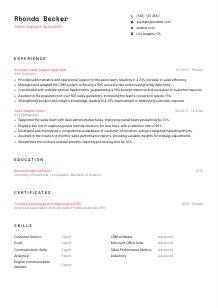
Reinforcing sales teams, but your resume feels like it's getting left on "hold"? Organize your pitch with this Sales Support Specialist resume example, built with Wozber free resume builder. Learn how to align your support savvy with job requirements, making sure your career trajectory remains as impressive as your sales numbers!
Sales support work sits at the point where sales activity either stays organized or starts leaking time. Hiring teams look for people who can keep CRM records clean, turn requests into accurate quotes and reports, and help reps move faster without creating downstream errors for customers or internal teams. Your resume should make that operational reliability visible from the start.
A tailored resume changes how quickly a recruiter can separate general administrative experience from true sales support experience. When your wording reflects CRM upkeep, reporting, quotation support, cross-functional coordination, and customer follow-through, it reads more clearly in both human review and ATS screening. Wozber's free resume builder helps shape that language into an ATS-compliant resume so the hiring team can quickly see where you improve sales workflow and customer response.
For Sales Support Specialists, the top of the resume should feel efficient and accurate, much like the work itself. Keep this section clean, easy to scan, and aligned with any stated requirements so a recruiter does not have to hunt for basics before getting to your CRM, reporting, or coordination experience.
Set your name at the top in a clear, readable style. Sales support roles rely on orderly documentation and attention to detail, so even this first line should look consistent and professional.
Place "Sales Support Specialist" directly under your name when that is the role you are pursuing. This immediately frames your background around sales operations, customer support flow, and administrative execution rather than broader office support work.
List the contact information a recruiter needs to move you forward quickly and without confusion.
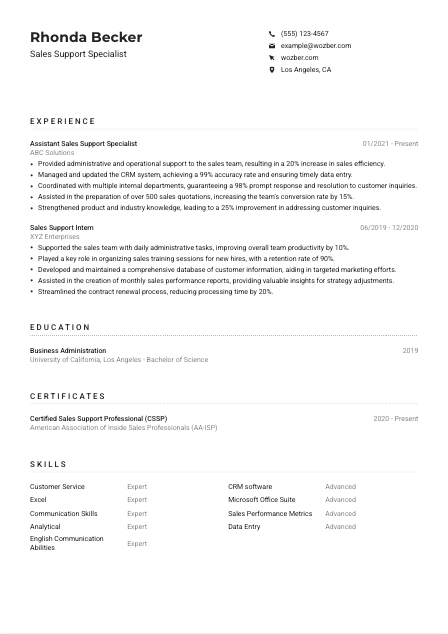
If the posting asks for a local candidate, include your city and state. In the provided example, "Los Angeles, CA" confirms a specific requirement right away and removes an avoidable question before the recruiter reaches the rest of the resume.
Include LinkedIn or a professional website if it supports your application with a consistent work history, recommendations, or related achievements. Check that titles, dates, and contact details match your resume exactly, especially if your experience includes sales reporting, customer support, or CRM-heavy roles.
This section should confirm that you are reachable, professionally presented, and aligned with any basic screening requirements. Then the hiring team can focus on the part that matters most for this role: how well you support sales execution.




This is where employers look for proof that you can keep the sales process moving. The most useful experience bullets show how you handled CRM accuracy, reporting, quotations, internal coordination, customer requests, and the day-to-day administrative work that improves response time and sales efficiency.
Start by identifying the recurring work named in the posting. For a Sales Support Specialist, that often includes CRM updates, sales reporting, presentation prep, quote and contract support, customer inquiry handling, and coordination with departments such as operations, finance, or customer service. Use those workflows to decide which past achievements belong in your bullets and which can be trimmed.
Use reverse chronological order and format each role consistently with job title, company, and dates. That structure matters in operational roles because recruiters often scan quickly for recent experience in sales support, customer service, or administrative support tied to revenue teams.
Focus on what changed because of your work. Strong bullets show improvements such as faster processing, cleaner CRM data, better response times, stronger quote volume, or higher team productivity. The example resume does this well with points like a 20% increase in sales efficiency and 99% CRM accuracy, both of which connect directly to the responsibilities in the posting.
Metrics make your contribution easier to understand when they reflect the work itself. Good examples include quote volume, CRM accuracy rate, turnaround time, response resolution rate, contract processing time, lead follow-up speed, or productivity gains. "Prepared over 500 sales quotations" carries more weight than a generic claim about helping the team.
Prioritize bullets that show sales-facing coordination, documentation accuracy, reporting support, or customer request handling. If a past role included unrelated administrative tasks, leave them out unless they show transferable value such as spreadsheet reporting, database management, or cross-team communication. Every line should move you closer to the work this opening actually requires.
A strong experience section should make it easy to picture you supporting account executives, keeping records current, and helping customers get timely answers. When your bullets tie action to outcomes, your value to the sales team becomes much easier to judge.
Education matters most here when it confirms the business foundation behind your work. For sales support roles, a degree in business, sales, or a related field strengthens the resume because it connects naturally to reporting, customer communication, and day-to-day commercial operations.
Read the posting carefully and surface the academic qualification it asks for. If the role requires a bachelor's degree in Business Administration, Sales, or a related field, make sure that degree is clearly listed rather than buried lower on the page.
List degree, field of study, school, and graduation year in a clean structure. Hiring teams reviewing many operational resumes do not need extra design here. They need to confirm qualification quickly and move on to your sales support experience.
If your degree lines up closely with the posting, state it plainly. In the sample resume, "Bachelor of Science in Business Administration" is worth displaying clearly because it mirrors the requirement almost word for word and removes any doubt about eligibility.
Early-career candidates can benefit from including coursework in sales, business communication, analytics, or Excel-based reporting, especially when professional experience is still limited. If you already have several years of relevant work, keep the section lean and let your CRM, reporting, and customer support achievements do the heavy lifting.
Awards, honors, or extracurricular work can help if they connect to the job, such as student sales competitions, business clubs, customer-facing leadership roles, or analytical projects. Add them only when they reinforce skills the role actually values, like communication, organization, or commercial awareness.
This section should answer one question quickly: do you have the academic background the role calls for? Once that is clear, the rest of the resume can concentrate on how you perform in a live sales environment.
Certifications are optional in many Sales Support Specialist roles, but the right one can sharpen your profile. They are most helpful when they reinforce practical strengths such as CRM use, sales operations, customer handling, reporting, or process support.
Start with credentials that relate directly to sales support activity. Sales support certifications, CRM platform training, Excel certifications, or customer service credentials usually carry more weight here than broad courses with no link to reporting, documentation, or sales process execution.
A short list of well-chosen certifications reads better than a long list of loosely related learning. The sample resume uses "Certified Sales Support Professional (CSSP)" effectively because it strengthens the candidate's positioning without distracting from the core experience section.
Include the completion date, and if the credential remains active, present that cleanly. This helps recruiters understand whether your training is recent and still relevant, especially for software, process, or industry certifications that can age quickly.
If you are actively growing in this field, look for learning that improves your day-to-day usefulness to a sales team. Training in Excel reporting, CRM administration, contract workflows, customer communication, or product knowledge can all strengthen future applications when they reflect the kind of work you actually do.
Relevant certifications can give extra confidence in your technical fluency or commitment to the field. They work best when they support the story already told by your experience, not when they try to replace it.
The skills section should mirror how sales support is actually evaluated. Employers usually want a mix of tool proficiency, customer-facing communication, data accuracy, reporting ability, and enough analytical comfort to work with sales metrics without constant supervision.
Extract the capabilities the role repeats or depends on. In this case, that includes CRM software, Microsoft Office with emphasis on Excel, communication, customer support, analytical thinking, sales metrics awareness, and accurate administrative execution. Those are the skills worth foregrounding because they connect directly to daily responsibilities.
Use the employer's phrasing where it reflects your real experience. If the posting asks for CRM proficiency and strong Excel skills, name those directly instead of hiding them behind vague terms like "technical" or "computer skills." The example resume handles this well by listing CRM software, Microsoft Office Suite, Excel, Sales Performance Metrics, and Communication Skills in clear language.
Put the most role-critical skills first and leave out abilities that do not help with sales support work. A focused list is more useful than a long inventory. Prioritize the tools and strengths that support reporting, customer requests, coordination, and documentation accuracy, then add secondary capabilities only if they reinforce the role.
Your skills should read like the toolkit of someone who can support a sales team on day one. When the list reflects actual systems, communication demands, and reporting tasks, it complements the evidence in your experience section instead of repeating it.
Language ability matters in sales support when the role involves customer communication, internal coordination, and written follow-up. Even when only one language is required, listing proficiency clearly can strengthen your profile for teams that serve varied markets or handle high volumes of client interaction.
If the posting explicitly asks for English communication ability, make English prominent in this section. That is especially important in roles involving customer inquiries, quote follow-up, and coordination across departments where written clarity affects speed and accuracy.
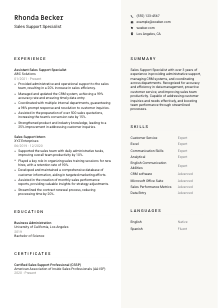
List the language most essential to the role first, then any additional languages that could help in customer-facing work. In a market like Los Angeles, adding Spanish after English can be useful when it reflects real proficiency and supports communication with a broader customer base.
Use clear labels such as Native, Fluent, Advanced, or Conversational. Sales support often depends on accurate written updates and polished verbal communication, so overrating language ability can create problems quickly in interviews or on the job.
Extra languages are valuable when they help with client communication, internal teamwork, or market coverage. They are especially worth including if you have used them in customer service, account support, or sales administration rather than only in casual settings.
Only expand on language capability if it genuinely adds hiring value. For most Sales Support Specialist resumes, one concise section is enough to show communication range without pulling focus from CRM work, reporting, and sales coordination experience.
For this kind of role, language skills matter most when they support smoother customer interaction and cleaner internal communication. Present them plainly, and let them strengthen the operational picture your resume already shows.
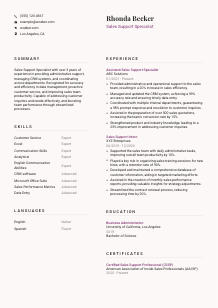
Your summary should quickly tell a recruiter what kind of sales support professional you are. The best versions combine years of experience with a few concrete strengths such as CRM accuracy, reporting support, customer communication, or improving the efficiency of the sales team.
Before writing, pull out the few requirements that define the position most clearly. For this role, that means sales team support, CRM management, reporting, documentation, customer inquiry handling, and communication. Use those themes to decide what belongs in the summary and what should stay in later sections.
Your first sentence should establish your background in direct terms. Mention your years of experience and the area you support, such as sales operations, customer service, CRM administration, or reporting. This helps the recruiter place you quickly among applicants from broader admin backgrounds.
Add two or three role-specific points that match the posting, such as maintaining accurate CRM records, preparing sales reports, supporting quotations and contracts, or coordinating customer responses across teams. The sample summary works because it connects experience with concrete strengths like data accuracy, process efficiency, and proactive customer service.
Aim for a short paragraph of three to five sentences. Avoid generic traits unless they are tied to work outcomes. "Improved sales team productivity through streamlined processes" says more than "hardworking team player" because it shows how you contribute in a sales support environment.
After reading your summary, a hiring manager should already understand your level, your core strengths, and the kind of sales operation you can support. If that is clear, the rest of the resume has a much easier job.
A Sales Support Specialist resume should leave little ambiguity about how you help revenue teams stay organized, responsive, and accurate. When your sections consistently point to CRM management, reporting, quote support, customer communication, and measurable improvements in efficiency or turnaround time, recruiters can picture you in the role much faster.
Use Wozber to tighten that alignment with an ATS-friendly resume format, focused keyword matching, and an ATS resume scanner that helps map job requirements to the right sections. The finished resume should make one thing easy to judge: you can keep the sales process moving without letting details slip.




