



Use Wozber and land your dream job
Create Resume
No registration required
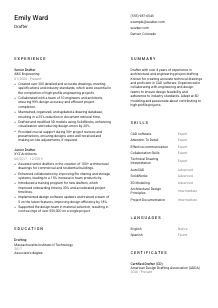
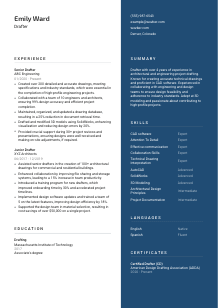
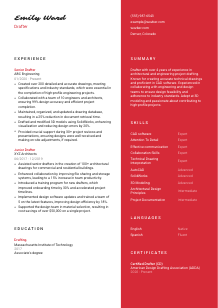
Sketching blueprints, but your resume feels like a rough draft? Check out this Drafter resume example, created with Wozber free resume builder. It shows how to align your drafting precision with job specifics, ensuring your career design is always on the right architectural trajectory!
Drafters are trusted with documents that other people build from, price from, and review for compliance. A resume for this field needs to show the same discipline. Hiring teams look for clean proof that you can turn rough inputs, engineering data, and design intent into accurate 2D drawings or 3D models without creating avoidable revision cycles.
A targeted resume also makes a concrete difference in screening. When the posting asks for CAD work, technical drawing accuracy, collaboration with engineers or architects, and English-language communication, those points should be easy to find in both the wording and structure of your application. Wozber's free resume builder helps you shape that content into an ATS-compliant resume, so the hiring team can quickly see your drafting scope, software fluency, and project support experience.
In drafting, small errors create downstream problems. Your contact section should reflect the same reliability you bring to drawings, file control, and revision handling. Keep it clean, factual, and aligned with any practical requirements listed in the posting.
Use your full name in a clear, readable format so it anchors the page immediately. Avoid decorative styling. For a drafter, presentation should feel orderly and technical, closer to a title block than a personal brand exercise.
Place the role title directly under your name if it matches the job you are pursuing. Using "Drafter" here helps align your resume with the opening and keeps your positioning clear, especially when employers are sorting candidates across drafting, design, and engineering support titles.
List a phone number you actually answer and a professional email address that looks current and business-ready. Accuracy matters here too. A typo in your contact line sends the wrong message for a role built on precision.
Some drafting roles are tied to office-based coordination, site reviews, or local project teams. If a posting specifies a city, reflect that clearly. In this example, Denver, Colorado belongs in the contact section because the employer asked candidates to be located there or willing to relocate.
A LinkedIn profile, online portfolio, or project page can help if it shows drafting work, model snapshots, software capability, or project context that supports your resume. Keep the content consistent with your resume, especially job titles, dates, and software listed.
Do not add age, marital status, or other unrelated personal details unless a specific jurisdiction or employer explicitly requires them. For drafting roles, the useful information is your professional identity, location, and how to contact you quickly for project-driven hiring timelines.
This section should read like the front edge of a well-managed drawing package. Clear name, correct title, reliable contact information, and location where relevant are enough to start the review on solid footing.




Drafting experience is reviewed for more than years on the job. Employers want to see what you produced, which tools you used, how closely you worked with engineers or architects, and whether your drawings helped projects move forward with fewer errors, revisions, or delays.
Start by identifying the work the employer needs done now. For this role, that includes creating and revising drawings from sketches and specifications, using CAD tools for 2D and 3D work, maintaining documentation, and supporting interdisciplinary reviews. Build your bullets around those same activities when they reflect your real experience.
Use reverse chronological order so your latest drafting scope appears first. For each role, include your title, company, and dates. That structure helps reviewers quickly track progression from junior production work to more independent drafting, modeling, documentation, or coordination responsibilities.
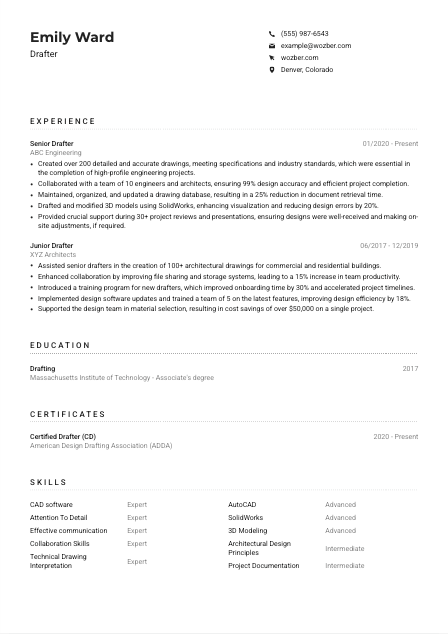
Your bullet points should show output and contribution, not just software use. Strong drafting bullets mention what you created, how much work you handled, what level of accuracy or compliance you maintained, and how your work supported delivery. The example resume does this well with details like producing more than 200 drawings, supporting project reviews, and improving visualization through SolidWorks models.
Quantify what you can: drawing volume, revision reduction, design accuracy, retrieval time, review support, cost savings, or project count. Metrics like "99% design accuracy" or "25% faster document retrieval" tell a hiring manager more than broad claims about being detail-oriented because they connect precision to workflow results.
Prioritize experience that shows drafting in architectural, engineering, manufacturing, or related project environments. If you have mixed experience, lead with bullets involving AutoCAD, SolidWorks, technical drawing interpretation, database updates, standards compliance, and collaboration with design stakeholders. That is much more useful than listing every general office task you handled around the work.
A drafter's experience section should show production volume, software fluency, revision control, and coordination with technical teams. When those points are specific, employers can picture how you would contribute to active projects from day one.
Formal training matters in drafting because it points to your grounding in technical drawing standards, CAD workflows, and design interpretation. Even when experience carries the most weight, the education section should clearly confirm that you meet the baseline the employer asked for.
If the job asks for an Associate's degree in Drafting or a related field, make that easy to see. List the degree exactly and avoid vague phrasing. In this example, the degree aligns cleanly with the posting because it states Associate's degree in Drafting.
Include degree, field of study, and school name in a straightforward order. If your graduation year helps clarify recency, add it. Keep the formatting simple so the credential is immediately readable during a fast application review.
If you are earlier in your career, relevant coursework can support your case. CAD, 3D modeling, technical drawing, architectural drafting, or engineering graphics are useful additions when they reinforce the type of projects you want to work on.
Honors, strong project work, or technical competitions are worth mentioning when they add genuine drafting relevance. For example, a capstone involving plan sets, fabrication drawings, or model development says more than a general academic award with no connection to the work.
Update the section as your career develops. Once you have several years of drafting experience, your education should stay concise and support the story rather than compete with your project history.
Your education section only needs to confirm the technical foundation behind your drafting work. When it is accurate and easy to read, it supports the rest of the resume without slowing down the review.
Certifications are not required for every drafter opening, but they can strengthen your profile when they reflect recognized standards, CAD capability, or ongoing development in the discipline. They work best as a supplement to project experience, not a substitute for it.
Some postings require none, while others value industry-recognized training or certification in drafting software or standards. This role does not require a certification, so any credential you list should add useful context rather than fill space.
Choose credentials that connect clearly to the work you want, such as drafting certification, CAD platform training, or discipline-specific documentation standards. The Certified Drafter credential in the example is relevant because it reinforces technical drafting competence in a recognizable way.
List the certification name, issuing body, and the date earned or active period. That gives reviewers enough detail to place the credential properly and shows the same documentation discipline expected in controlled drawing environments.
If your target roles involve newer CAD workflows, 3D modeling, or updated standards, ongoing training can help. Add new certifications when they meaningfully support the kind of drafting work you are applying for, especially if they deepen your software range or standards knowledge.
A relevant certificate can strengthen your resume by confirming professional development and technical discipline. Keep the section selective so every entry supports the type of drawings and project work you want to do next.
A drafter's skills section should quickly confirm the tools, technical strengths, and collaboration habits behind the work. Hiring teams often scan this section early for CAD platforms, modeling capability, drawing accuracy, and the ability to work smoothly with engineers, architects, or project teams.
Start with the abilities the employer named directly. Here, that includes CAD software, 2D and 3D modeling, attention to detail, and collaboration. Those should appear in your skills section if they are part of your real working experience, using the same terminology where possible for stronger ATS alignment.
List both technical and interpersonal skills, but keep them relevant to drafting workflows. AutoCAD, SolidWorks, 3D modeling, technical drawing interpretation, and project documentation belong alongside communication and coordination skills because drafting often involves markups, revisions, and cross-functional feedback loops.
Lead with the skills most central to the target role, especially named software and drafting capabilities. Broad items such as communication should support, not overshadow, the tools and technical competencies that define your day-to-day value. The sample resume handles this well by foregrounding CAD, AutoCAD, SolidWorks, and technical drawing before broader supporting strengths.
This section should confirm your software stack, modeling ability, drawing precision, and team coordination at a glance. When the ordering is right, the employer can connect your skills to the project work in your experience section almost immediately.
Language ability matters in drafting because instructions, review comments, specifications, and revision requests need to be understood exactly. If the posting names a required language, treat that as a practical qualification rather than a minor detail.
List any language explicitly required in the posting at the top of the section. For this role, English should appear first because the employer states that performing the job in English is essential.
Use clear levels such as Native, Fluent, Intermediate, or Basic so reviewers can quickly understand how you communicate in meetings, written updates, and project documentation. Avoid vague labels that do not indicate working ability.
Extra languages can be useful when working with diverse project teams, consultants, contractors, or clients. They are not the center of a drafting resume, but they can add value when they support coordination across job sites or multi-regional work.
Choose ratings that reflect your real ability to speak, read, and write. In drafting environments, overstatement can quickly become visible when someone needs to read specifications, interpret comments, or explain revisions.
Frame your language section around practical use. For a drafter, that means being able to follow technical direction, contribute in review meetings, and communicate changes clearly when drawings or models are being updated.
For drafting roles, language skills matter when they support accurate communication around plans, revisions, and technical documentation. Keep the section concise and job-relevant.
Your summary should give a hiring manager a fast read on the kind of drafting work you handle, the tools you use, and the project environment you know. In a few lines, it should position you for the opening without repeating the full resume.
Read the posting closely and identify the few points that define the role. In this case, the summary should help connect your background to CAD drafting, 2D and 3D modeling, accurate technical drawings, and collaboration with engineers or architects.
Begin with your experience level and the environments you have worked in, such as architectural or engineering drafting. That first sentence should orient the reader quickly. The example does this effectively by stating more than 4 years of experience in architectural and engineering project drafting.
Use the middle of the summary to name the software or drafting strengths most relevant to the role and pair them with how you work. For example, proficiency in CAD software matters more when it is linked to creating accurate technical drawings, supporting design feasibility, or maintaining standards across project teams.
Aim for a short paragraph that covers your level, technical strengths, and the type of value you bring. Avoid broad claims and focus on what a drafter is actually hired to do: produce reliable drawings, support revisions, and work effectively with technical stakeholders.
A good drafter summary gives the reviewer a clear starting point. By the time they reach your experience section, they should already understand your software range, project context, and the level of drafting responsibility you can carry.
Use these sections to present yourself the way drafting teams work every day: accurately, clearly, and with the right technical detail in the right place. Wozber's free resume builder can help you organize that content into an ATS-friendly resume that matches the language of the role without losing the substance of your actual experience.
If you are refining bullets, checking ATS optimization, or aligning your resume with a specific posting, Wozber's ATS resume scanner and ATS-friendly resume templates make that process faster and easier to manage. The result should make one thing obvious to the employer: you can produce dependable drawings, support project coordination, and contribute effectively from the first review cycle.




