



Use Wozber and land your dream job
Create Resume
No registration required
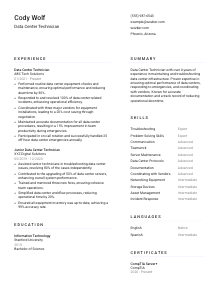
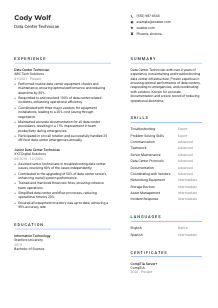
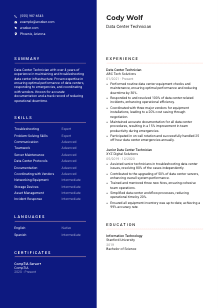
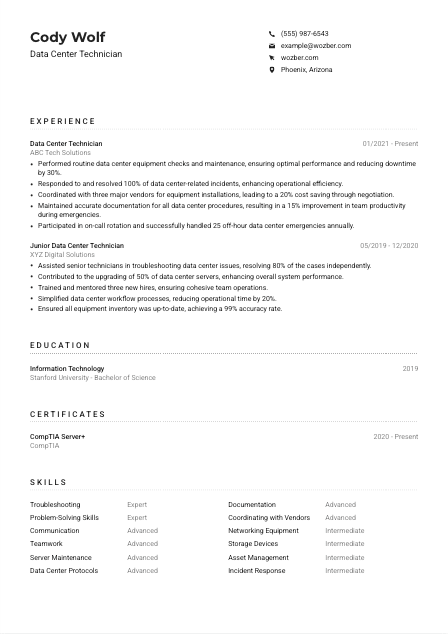
Navigating digital realms, but your resume seems offline? Sync up with this Data Center Technician resume example, created with Wozber free resume builder. Learn how to match your infrastructure insights to job specifications, ensuring your career loads as efficiently as a well-routed server!
Data center technicians work where small hardware issues can turn into outages, delayed deployments, or overnight escalations. Hiring teams look for people who can keep racks, servers, storage, and network equipment running reliably, respond calmly during incidents, and document changes well enough that the next shift can act without guesswork. Your resume should make that operational discipline visible.
A tailored resume changes how quickly your background reads against the actual environment being supported. For a data center opening, that usually means surfacing hands-on infrastructure work, incident response, maintenance routines, and on-call reliability in language that also holds up in ATS screening. Wozber's free resume builder helps organize that experience into an ATS-friendly resume format so the hiring team can quickly see where you've reduced downtime, handled equipment issues, and supported stable operations.
For a Data Center Technician, the header should confirm practical basics fast: who you are, what role you do, and whether you're reachable for interviews, on-call discussions, or relocation questions. Keep it clean and job-specific.
Use your full name in a clear, readable format so it stands out immediately at the top of the page. In technical operations hiring, that first line does not need flair. It needs to be easy to find when a recruiter is reviewing multiple resumes or matching your document to an application record.
Place "Data Center Technician" directly under your name if that reflects your recent experience or the role you are targeting. This helps position you correctly from the first glance, especially when employers are sorting through adjacent profiles such as desktop support, field service, NOC, or systems support.
List a phone number you answer and a professional email address that will not raise questions. Double-check both. For roles that may involve urgent scheduling, on-call expectations, or shift coverage, broken contact information creates avoidable friction.
If the employer specifies a location requirement, reflect it clearly in your header. In the example here, Phoenix, Arizona appears in the personal details because the opening requires candidates to be located there or willing to relocate. Use this only when it helps remove a real logistics question for the employer.
Include LinkedIn, a professional website, or a technical portfolio only if it supports your application. For this profession, useful extras might include infrastructure certifications, lab work, or documented projects involving server hardware, networking, monitoring, or asset tracking. Keep those links current and consistent with the resume.
This section should answer practical questions fast so the reader can move straight to your infrastructure experience, incident handling, and data center operations background.




This section carries the most weight for most Data Center Technician openings. Employers want to see hands-on work with physical infrastructure, routine maintenance, troubleshooting under pressure, and measurable results such as reduced downtime, faster incident resolution, cleaner documentation, or smoother installations.
Read the job description closely and mark the exact responsibilities that define the environment. In this case, phrases like "routine data center equipment checks," "respond to incidents," "equipment installations and upgrades," and "maintain documentation" tell you what to foreground. Mirror that language where it truthfully matches your experience so both recruiters and ATS tools can connect your background to the work.
List your positions in reverse chronological order and make the most relevant work easiest to scan. If you have held titles such as Data Center Technician, Infrastructure Technician, or Junior Data Center Technician, place those roles prominently and make sure the bullet points show what systems you supported, what equipment you maintained, and what operational scope you handled.
Do not stop at "maintained servers" or "helped with incidents." Show what changed because of your work. The example resume does this well by tying routine equipment checks to a 30% downtime reduction and documentation improvements to better emergency productivity. Those are the kinds of outcomes that make maintenance work feel real and valuable.
Numbers are especially useful in operations roles because they show consistency and scale. Include details such as incident closure rate, uptime improvements, server refresh volume, inventory accuracy, off-hours emergencies handled, vendor count, or response time improvements. A line like "resolved 100% of assigned data center incidents" lands because it reflects reliability in a support environment where missed issues have consequences.
Keep this section focused on work that strengthens your case for the target role. Prioritize hardware troubleshooting, rack and stack support, installations, upgrades, monitoring, documentation, vendor coordination, and on-call coverage. If a past job included unrelated duties, trim them unless they support a skill the employer clearly needs.
Your experience section should leave no doubt that you can maintain equipment, respond to incidents, and support day-to-day data center operations without losing control of detail, uptime, or documentation.
Education matters here as supporting context, especially when the posting prefers a bachelor's degree in Information Technology or a related field. It should confirm your technical base without distracting from the hands-on experience that usually drives hiring decisions in data center operations.
Check whether the employer names a degree, field of study, or equivalent background. Here, a bachelor's degree in Information Technology or a related field is preferred, so candidates with that background should make it easy to spot. If your degree is in a neighboring discipline such as computer systems, network engineering, or information systems, list it clearly.
Keep the layout simple: degree, field, school, and graduation year or date range. Technical resumes are often scanned quickly, and a straightforward education entry helps the reviewer confirm qualifications without searching through extra text.
If your degree directly supports the role, do not bury the field of study. In the example, a Bachelor of Science in Information Technology lines up neatly with the employer's preference and reinforces the candidate's grounding in systems, infrastructure, and technical support.
Most experienced technicians do not need a long course list. Include selected courses only if they strengthen your case, such as networking, server administration, storage systems, operating systems, or information security. This is most useful for early-career candidates or recent graduates.
Projects, lab work, honors, or technical clubs can help if they connect to real infrastructure work. A capstone on network design, server virtualization, or hardware deployment is more relevant here than general campus involvement. Keep the emphasis on applied technical work.
Use this section to confirm your technical base, then let your experience carry the argument that you can handle live infrastructure, maintenance routines, and data center incidents.
Certifications help when they sharpen your technical profile and show current knowledge of server, hardware, networking, or operations practices. For Data Center Technicians, they are especially useful when they back up the kind of equipment support and troubleshooting the role requires.
Even when a job description does not list mandatory certifications, the responsibilities often reveal what kinds of credentials will strengthen your application. A role centered on server maintenance, troubleshooting, and infrastructure support pairs naturally with certifications in hardware, servers, networking, or vendor-specific platforms.
Choose certificates that connect clearly to data center operations. CompTIA Server+, Network+, Linux-related certifications, or vendor credentials tied to servers and infrastructure can all be relevant depending on the environment. In the example, CompTIA Server+ works well because it reinforces the candidate's server maintenance background.
Add the issue date and, if relevant, the expiration or active period. This matters more for technical credentials than many candidates realize, especially when employers want confidence that your knowledge is current enough for active infrastructure support and upgrade work.
Data center environments change through hardware refresh cycles, updated best practices, and evolving operational standards. Ongoing certification work shows that you stay current with the tools and procedures behind stable uptime, cleaner troubleshooting, and safer maintenance activity.
A well-chosen certification section supports your resume by confirming that your practical experience is backed by current infrastructure knowledge and continued professional development.
The skills section should read like a technician's working toolkit, not a generic list of soft traits. Focus on the capabilities that matter in equipment maintenance, incident response, documentation, vendor coordination, and the physical and procedural side of keeping a data center running.
Start with the language the employer already uses. For this opening, that includes troubleshooting, maintaining servers, storage devices, networking equipment, knowledge of data center protocols, communication, teamwork, and problem-solving. If you have those skills, use the same wording or close variants so your resume aligns naturally with the posting and ATS review.
Lead with the abilities most central to the job rather than listing everything you have touched. For a Data Center Technician, that often means troubleshooting, server maintenance, incident response, documentation, hardware support, networking equipment, storage systems, and vendor coordination. The example skills list works best where it stays close to these operational needs.
Group or order skills in a way that reflects how the work is done. Put core technical skills near the top, followed by operational and collaboration skills that matter on shift, during installations, or in escalations. Avoid inflating your level. A tighter, believable skills list is more useful than a long catalog of vague strengths.
This section should quickly tell the reader that you can troubleshoot infrastructure, work within data center procedures, communicate during incidents, and support stable operations from routine checks to emergency response.
Language matters in technical operations when instructions, escalations, tickets, and handoff notes need to be understood without ambiguity. For Data Center Technicians, this section is usually brief, but it still helps confirm that you can communicate clearly in the environment described by the posting.
If the employer states a language requirement, list it plainly. Here, English is required, so your resume should show your English proficiency clearly enough that there is no question about your ability to handle tickets, procedures, vendor communication, and incident updates.
Lead with the language that matters most to the role. In this case, English should appear first with an honest proficiency level such as Native or Fluent. This is especially useful in roles where on-call handoffs, documentation accuracy, and safety-related communication matter.
Additional languages can help in global operations, vendor coordination, or multilingual teams, but they should remain secondary unless the role specifically calls for them. The example includes Spanish as an added capability, which is fine as a supporting detail rather than a core qualification.
Stick to clear terms such as Native, Fluent, Advanced, Intermediate, or Basic. Technical teams do not need decorative phrasing here. They need a realistic sense of how comfortably you can communicate in work situations.
For most Data Center Technician resumes, languages are a supporting section, not a headline. Include enough to answer the employer's communication requirement, then let your experience and technical skills carry the application.
This section should quickly show that you can handle the language demands of tickets, troubleshooting discussions, handoffs, and vendor interaction in the target environment.
Your summary sits at the top of the resume and sets the hiring lens for everything that follows. For a Data Center Technician, it should establish your years of experience, the infrastructure you work with, and the operational strengths that matter most, such as uptime support, incident response, maintenance discipline, and documentation.
Before writing, identify the core themes in the posting. Here, the job centers on data center operations, infrastructure maintenance, troubleshooting, documentation, vendor coordination, and on-call response. Those themes should shape your summary so it reflects the work, not a generic IT profile.
Start with your title, experience level, and area of specialization. A line like "Data Center Technician with 4+ years of experience supporting servers, storage, and networking equipment in live operations" tells the reader far more than a broad statement about being results-driven or passionate about technology.
Use the next sentence or two to highlight the strengths that matter most for this opening. In the example, reduced downtime, emergency response, vendor coordination, and accurate documentation all support the employer's priorities. Pick the strengths that best match your own record and the target environment.
Aim for three to five lines with clear technical meaning. Avoid stuffing in every skill or repeating your experience bullets. A concise summary works best when it gives the hiring team a quick read on your operational background and makes them expect the right details in the sections below.
A focused summary should make it immediately clear that you are experienced in maintaining infrastructure, responding to issues, and supporting reliable data center operations. That is the frame the rest of your resume should confirm.
A Data Center Technician resume should show that you can keep infrastructure stable, respond effectively when equipment fails, and maintain the documentation and coordination that live environments depend on. When each section points back to those responsibilities, your application reads with far more credibility.
Use Wozber's free resume builder to organize your experience, refine role-specific wording, and create an ATS-compliant resume that reflects the language of the job description without sounding forced. The finished resume should make it easy to judge your readiness for maintenance work, incident response, and day-to-day data center operations.




